
Searching Frio County Criminal Dockets
For Frio County district criminal settings, the main online stop is the 81st and 218th District Court docket archive. It sorts by week. There is no public name search. Open the week you want. Pick the Frio Criminal Appear Docket. Then check for a Criminal Addition Docket too. For indictment and first-appearance or arraignment dates, the separate indictment archive may have them. County Court matters run through the county docket index instead.
Before you search, gather the court level, the likely setting date, and the cause number. A name helps inside a searchable PDF, but the cause number is the sharper tool. When text search comes up empty, the PDF may just be a scan. Or the case may sit on another date.
- Identify district, County Court, justice, municipal, or federal jurisdiction.
- Open the matching date or week and choose the criminal PDF.
- Search the PDF for the cause number or exact case style.
- Read the setting type, time, comment, and attorney line.
- Check any addition file, then confirm through the proper clerk.
Frio Weekly Appear Dockets
One weekly post can hold two lists. There is a main appear docket plus a supplemental addition docket. The August 17, 2026 Frio post shows how this local publication works. An addition is not a new prosecution or an amended file. It is simply another setting list for the same week, so a complete date check means opening both PDFs.
The official weekly publication also makes clear something else. The week and county labels deserve a look before any file is opened.
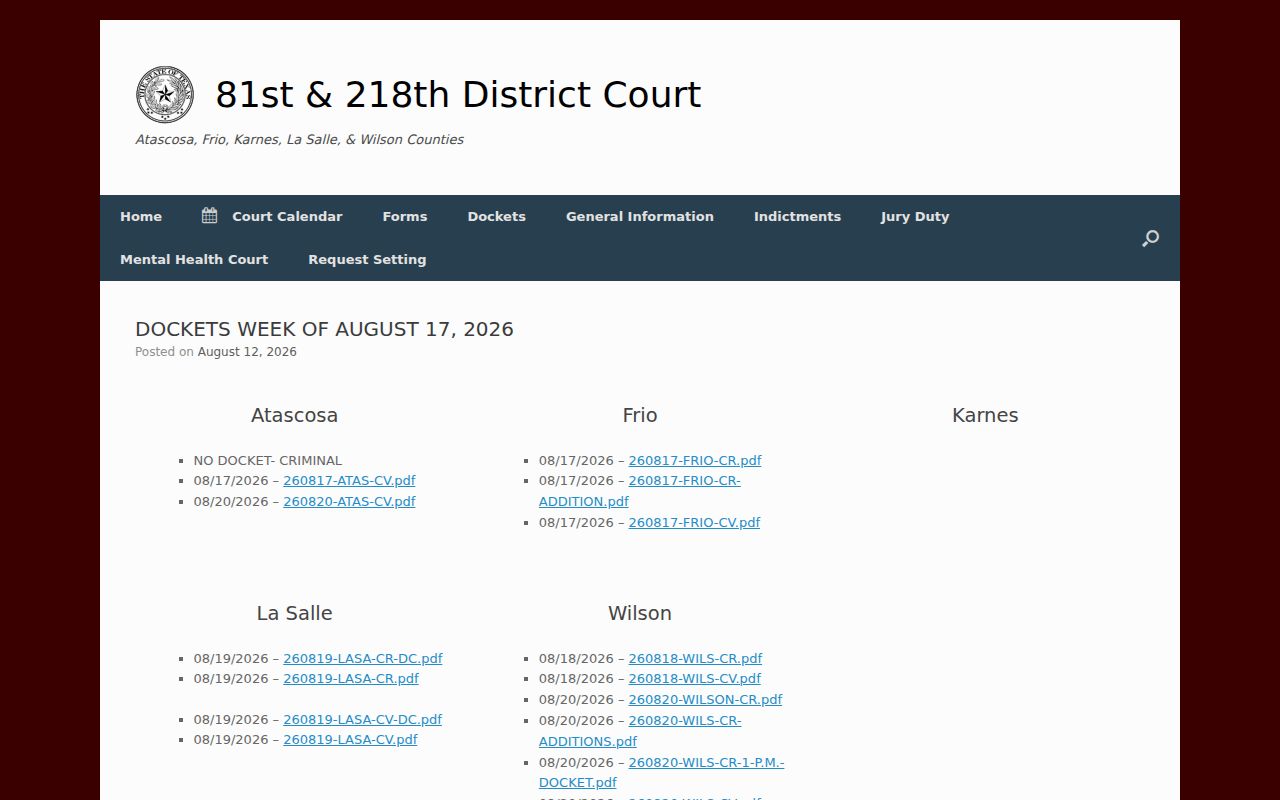
The county-specific links keep criminal, criminal-addition, and civil lists separate. Nothing merges all Frio County cases into one result.
Inside a Frio Criminal Docket
A Frio County district criminal entry is a structured calendar line, not a narrative. Each line carries the criminal cause number, case style, setting time, filing date, case age, case type, docket-set value, setting comment, and attorney information. A local cause number often looks like YY-MM-#####CRF. Treat that pattern as an illustration only. It is not a live cause.
| Cause number | Local identifier used to match the docket to the clerk-held file. |
|---|---|
| Setting date and time | When the listed event is scheduled, subject to later change. |
| Case type | The court's category, not a full statement of all allegations. |
| Docket set | The calendar or setting group assigned to the matter. |
| Setting comment | A short scheduling note that requires cautious reading. |
| Attorney line | Representation listed for that setting. |
The PDF is not a full event register. It cannot replace filed motions, signed judgments, or certified copies from the Frio County District Clerk.
Frio Criminal Setting Codes
District calendars and criminal sheets speak in shorthand. ARR is arraignment, PT is pretrial, JDC is jury docket call, JT is jury trial, GJ is grand jury, and NJ is non-jury. A comment may also flag sentencing, a possible plea, an interpreter request, monitoring compliance, or a return from a state hospital. Those words say why the case appears that day. They say nothing about the outcome.
- ARR
- Arraignment, when the charge and plea process are addressed.
- PT
- A pretrial setting before trial or final disposition.
- JDC
- Jury docket call, often paired with a later jury-trial date.
- Possible plea
- A planned plea-related setting, not proof that a plea occurred.
- Dismissal setting
- A calendar label that is not itself a signed dismissal order.
Read the exact comment. Then get the signed order or clerk confirmation before calling any result final. A future JT reference is a scheduling clue, not a promise that trial happens that day.
How a Criminal Case Moves
A Frio County criminal case can surface on several publications as it moves. An indictment list may come before arraignment. Pretrial and docket-call settings follow. Plea, non-jury trial, jury trial, disposition, and sentencing can each generate its own entry. The docket highlights what comes next, so one line rarely tells the whole procedural story.
Docket flow: Filing or Indictment › Arraignment › Pretrial › Plea or Trial › Disposition › Sentencing
A reset moves the setting; it does not erase the case. In the same way, a "possible plea" comment shows no plea was actually entered, and a dismissal calendar does not prove the judge signed one. Only the court file answers those questions.
When a Frio Case Is Missing
A missing name is not a disposition. Check the week, the main appear docket, and any addition first. Then try the cause number without punctuation in the PDF viewer. Still nothing? Rethink the court itself. A misdemeanor-style County Court setting, a JP matter, a municipal citation, or a federal prosecution will not necessarily show up in the district weekly file.
Best next step: Give the proper clerk the court, approximate filing year, cause number if known, and the exact setting or document sought. Ask whether publication lag, a changed date, or another court explains the result.
re:SearchTX offers statewide integrated records. Its own state reporting, though, describes criminal document coverage as excluded from the referenced population. Confirm live Frio criminal coverage there before treating a blank statewide result as complete.
Courts That Hold Criminal Dockets
Which court holds the docket depends on jurisdiction. The 81st and 218th Judicial District Courts handle Frio County felony and other district criminal work, and the Frio County District Clerk keeps the local case file. The County Clerk posts County Court criminal dockets. Four Justice Courts, plus the Pearsall and Dilley municipal courts, keep their own fine-only or justice-level records.
| Court layer | Typical route | Record keeper |
|---|---|---|
| District Courts | Weekly criminal and indictment PDFs | District Clerk |
| Frio County Court | Date-indexed county PDFs | County Clerk |
| Justice Courts | Precinct court contact | Each JP court |
| Municipal Courts | City clerk and local payment route | Pearsall or Dilley clerk |
| Federal Court | PACER | Western District of Texas |
Federal Frio County prosecutions fall to the San Antonio Division and sit outside the county PDF systems.
Frio Docket Versus Case File
A docket entry is only a snapshot. The criminal case file is bigger. The clerk-held file can contain indictments, motions, notices, orders, judgments, and other filed papers. Take the cause number from the setting sheet. Use it when you ask the District Clerk for a district document or the County Clerk for a County Court document. Case-record and e-file status questions go somewhere else. The regional court itself directs those to the county District Clerk.
Electronic filing is separate from public access, too. eFileTexas is the filing channel for participants, and it does not make every filing public. A file-stamped copy held by a party, a public docket PDF, and a certified clerk copy each serve a different purpose. Say which one you need.
Sealed Dockets and Public Access
Many adult criminal settings are public. Access still has firm boundaries. Juvenile information, expunged material, nondisclosed records, sealed files, protected-victim details, and confidential child information never appear in an ordinary Frio County court records search. Sample docket field inventories may include birth-date fields, and those private values should not be copied or republished.
Key access rules:
Texas Family Code Chapter 58 protects juvenile justice information and limits who may receive it.
Code of Criminal Procedure Chapter 55A supplies the state expunction framework.
Texas judicial records policy distinguishes court case records from judiciary administrative records governed by Rule 12.
No single request unlocks everything. Under the Texas Public Information Act, direct each case-record request to the clerk who maintains the originating file.
Confirming a Frio Criminal Outcome
Setting comments are leads, not verdicts. A comment never proves a plea happened. For a filed plea, dismissal, judgment, or sentence, request the controlling order from the proper Frio County clerk. Give the cause number and document type. Say whether a plain or certified copy is required. The District Clerk page provides the district records and open-record route; the County Clerk page provides county-level request limits.
The County Clerk accepts identified public-record searches by email or in person. Phone and fax requests are not accepted. That office also warns that extensive searches may carry a charge. Meanwhile, district, county, JP, municipal, and federal payment and copy rules all differ. Never transfer one office's instructions to another.